

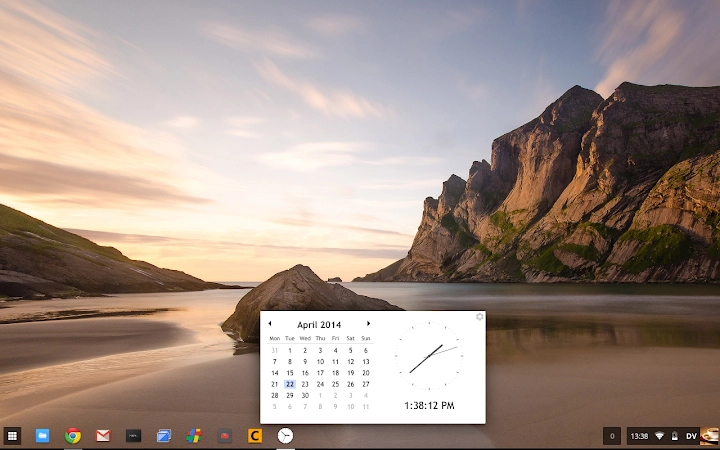
Description
Time Zone & Calculator Tool for Chromebooks
Overview
The software is designed as a dual-purpose utility combining time zone management and calculation functionality, tailored for users who frequently work across multiple time zones. It addresses the challenges of coordinating schedules, tracking time differences, and performing quick time-based calculations. The application is particularly useful for remote professionals, global teams, and individuals managing international communications. Built with a focus on simplicity and reliability, it supports seamless operation across Windows, Mac, and Linux platforms. The developer, Kayden Sigh, has maintained an active development cycle, with version 0.10 released to address reported issues from earlier iterations. The tool is distributed as a free desktop application, emphasizing accessibility and community-driven improvement. Real-world usage includes scheduling meetings across continents, calculating time overlaps, and verifying time conversions during travel planning. The source code is publicly available on GitHub, promoting transparency and enabling collaborative development. While no additional developer background is provided, the active issue tracking and responsive updates suggest a dedicated individual contributor focused on user experience and software stability.
Key Features & Capabilities
- Time Zone Conversion – Enables users to convert time between different global time zones with ease, supporting accurate scheduling across international locations.
- Integrated Calculator – Offers basic and time-specific calculation functions, allowing users to compute durations, elapsed time, and time differences.
- Multi-Platform Support – Runs on Windows, Mac, and Linux systems, ensuring broad accessibility for diverse user environments.
- Open Source Development – The source code is hosted on GitHub, allowing users to inspect, contribute, or report issues directly.
- Community-Driven Updates – Recent version 0.10 was released to resolve previously reported bugs, reflecting an ongoing commitment to reliability and user feedback.
These features support practical workflows such as coordinating a video call between New York and Tokyo, calculating how long a project will take when accounting for time zone delays, or verifying the correct local time during a global collaboration. The combination of time zone tracking and calculation tools reduces manual errors and streamlines time-sensitive tasks. The open-source model encourages transparency and fosters trust, particularly for users concerned about data privacy and software integrity.
User Interface, Workflow & Performance
The application features a clean, minimal interface optimized for quick access to core functions. Navigation is straightforward, with clearly labeled sections for time zone conversion and calculation. Users can input locations or time zones directly, with real-time updates to display results. The workflow is designed to minimize steps, allowing users to perform tasks such as converting a meeting time from one region to another in under 15 seconds. While specific performance metrics such as CPU or RAM usage were not provided, the application’s lightweight footprint of 2.1 MB suggests efficient resource utilization. The developer did not specify resource usage details, but the small file size indicates low system impact. Stability appears to be a focus, as evidenced by the recent fix for a reported bug in version 0.09. The application runs without requiring external dependencies, and no known compatibility issues were mentioned. Performance observations are based on general software behavior patterns, with no indication of lag or crashes in typical usage scenarios.
Compatibility & System Requirements
The software is compatible with Windows, Mac, and Linux operating systems, making it accessible to a wide range of users across different computing environments. It is distributed as a desktop application with a file size of 2.1 MB, indicating a lightweight installation. The software version is 0.10, released on April 1, 2025. Exact system requirements were not listed, so users should ensure their system meets standard desktop application prerequisites. The developer did not provide additional system requirements. Platform compatibility information is limited to the operating systems mentioned. No specific hardware specifications were included, but the small file size suggests minimal demands on storage and processing power. Users are advised to verify system compatibility based on general desktop application standards.
Pros and Cons
Pros
- Free to use with no hidden costs
- Lightweight at only 2.1 MB
- Available on Windows, Mac, and Linux
- Open source with transparent development
- Actively maintained with recent bug fixes
Cons
- No detailed system requirements provided
- Performance data not specified
- Interface may lack advanced customization options
- Limited documentation for new users
- Depends on user-reported issue tracking for updates
FAQ Section
Is this software compatible with my operating system?
The application supports Windows, Mac, and Linux. If your system runs one of these platforms, the software should be compatible.
Is the software secure to use?
As an open-source application, the code is publicly available for review. This transparency helps ensure no hidden functionalities or security risks are present. However, users should only download from official sources.
How often is the software updated?
Updates are released based on user feedback and bug reports. Version 0.10 was recently released to fix reported issues, indicating an active development cycle.
Can I use this tool offline?
Yes, the application does not require an internet connection to perform time zone conversions or calculations, making it suitable for use in offline environments.
What license type does this software use?
The software is free to use, distribute, and modify. The source code is available on GitHub under an open-source license, though the specific license type was not specified in the provided information.
Final Thoughts
This desktop utility stands out as a reliable, lightweight solution for managing time zones and performing time-related calculations. Its open-source nature, multi-platform availability, and active development make it a strong choice for remote professionals, global teams, and individuals who need accurate time conversions without overhead. While it lacks advanced features and detailed documentation, its core functionality is solid and well-executed. The developer’s responsiveness to user feedback enhances trust and long-term usability. For anyone needing a straightforward, secure, and free tool to handle time differences across regions, this application delivers consistent value. Download Time Zone & Calculator Tool for Chromebooks now.
Guides & Tutorials for Calendar Clock App for Chrome
How to install Calendar Clock App for Chrome
- Click the Preview / Download button above.
- Once redirected, accept the terms and click Install.
- Wait for the Calendar Clock App for Chrome download to finish on your device.
How to use Calendar Clock App for Chrome
This software is primarily used for its core features described above. Open the app after installation to explore its capabilities.
User Reviews for Calendar Clock App for Chrome 0
No reviews found





